# Города

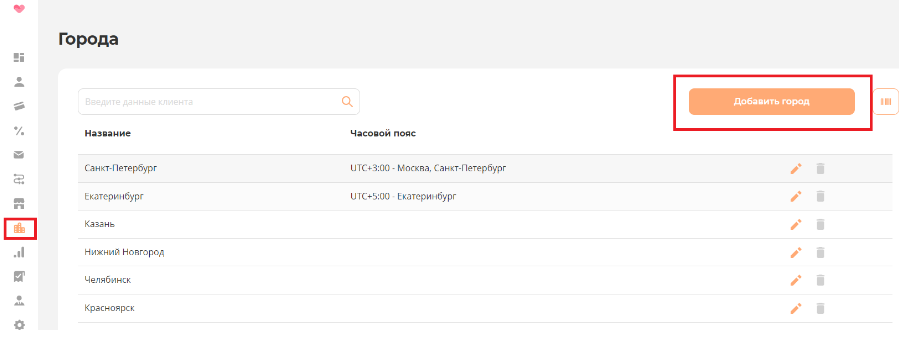
<span style="font-size: 12pt; font-family: 'Times New Roman',serif; color: #000000; background-color: transparent; font-weight: 400; font-style: normal; font-variant: normal; text-decoration: none; vertical-align: baseline; white-space: pre-wrap;">Для добавления города, необходимо зайти во вкладку </span><span style="font-size: 12pt; font-family: 'Times New Roman',serif; color: #000000; background-color: transparent; font-weight: bold; font-style: normal; font-variant: normal; text-decoration: none; vertical-align: baseline; white-space: pre-wrap;">Города</span><span style="font-size: 12pt; font-family: 'Times New Roman',serif; color: #000000; background-color: transparent; font-weight: 400; font-style: normal; font-variant: normal; text-decoration: none; vertical-align: baseline; white-space: pre-wrap;"> и нажать кнопку </span><span style="font-size: 12pt; font-family: 'Times New Roman',serif; color: #000000; background-color: transparent; font-weight: bold; font-style: normal; font-variant: normal; text-decoration: none; vertical-align: baseline; white-space: pre-wrap;">Добавить город</span>

[![image.png](https://wiki.mini.bonus-rarus.ru/uploads/images/gallery/2024-12/scaled-1680-/ts6image.png)](https://wiki.mini.bonus-rarus.ru/uploads/images/gallery/2024-12/ts6image.png)

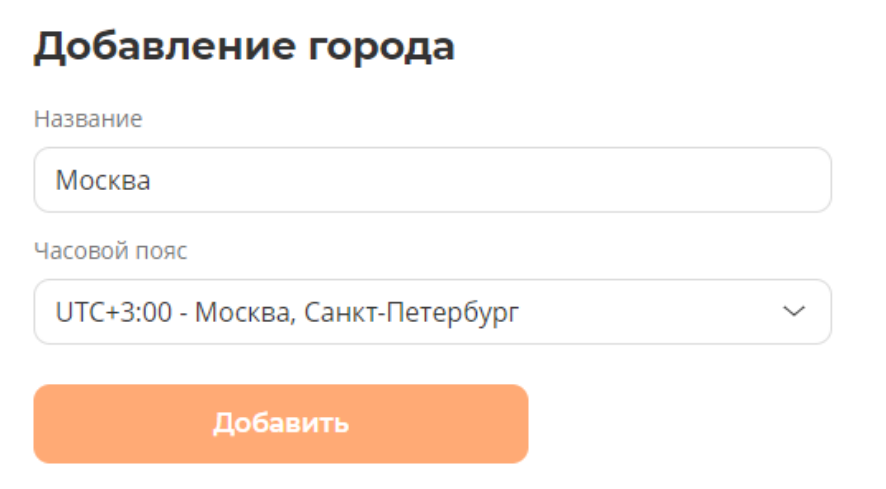
<span style="font-size: 12pt; font-family: 'Times New Roman',serif; color: #000000; background-color: transparent; font-weight: 400; font-style: normal; font-variant: normal; text-decoration: none; vertical-align: baseline; white-space: pre-wrap;">Необходимо заполнить форму и нажать кнопку </span><span style="font-size: 12pt; font-family: 'Times New Roman',serif; color: #000000; background-color: transparent; font-weight: bold; font-style: normal; font-variant: normal; text-decoration: none; vertical-align: baseline; white-space: pre-wrap;">Добавить</span>

[![image.png](https://wiki.mini.bonus-rarus.ru/uploads/images/gallery/2024-12/scaled-1680-/ksHimage.png)](https://wiki.mini.bonus-rarus.ru/uploads/images/gallery/2024-12/ksHimage.png)

<span style="font-weight: normal;">  
</span>

<span style="font-size: 12pt; font-family: 'Times New Roman',serif; color: #000000; background-color: transparent; font-weight: 400; font-style: normal; font-variant: normal; text-decoration: none; vertical-align: baseline; white-space: pre-wrap;">Все добавленные города будут отображаться списком в разделе </span><span style="font-size: 12pt; font-family: 'Times New Roman',serif; color: #000000; background-color: transparent; font-weight: bold; font-style: normal; font-variant: normal; text-decoration: none; vertical-align: baseline; white-space: pre-wrap;">Города</span><span style="font-size: 12pt; font-family: 'Times New Roman',serif; color: #000000; background-color: transparent; font-weight: 400; font-style: normal; font-variant: normal; text-decoration: none; vertical-align: baseline; white-space: pre-wrap;">. С помощью кнопок </span>

[![image.png](https://wiki.mini.bonus-rarus.ru/uploads/images/gallery/2024-12/scaled-1680-/m8mimage.png) ](https://wiki.mini.bonus-rarus.ru/uploads/images/gallery/2024-12/m8mimage.png)<span style="font-size: 12pt; font-family: 'Times New Roman',serif; color: #000000; background-color: transparent; font-weight: 400; font-style: normal; font-variant: normal; text-decoration: none; vertical-align: baseline; white-space: pre-wrap;">можно редактировать информацию о городе или удалить город совсем.</span>